> ## Documentation Index
> Fetch the complete documentation index at: https://docs.rankbuddy.io/llms.txt
> Use this file to discover all available pages before exploring further.
# Connect Webflow
> Send the SEO articles you write in RankBuddy to your Webflow CMS collection, review them as drafts, and publish when you're ready.
RankBuddy writes SEO articles for your website. The Webflow integration delivers them into your Webflow CMS collection, so nothing has to be copied between tools.
Articles arrive as **CMS drafts**. You review them in Webflow and publish when you're ready — RankBuddy never puts a page on your live site unless you switch that on yourself.
## Prerequisites
A Webflow site with a **CMS collection** for your posts (for example `Blog Posts`).
The collection has a **Rich Text** field for the article body. Without one, RankBuddy cannot map the article and will say so during setup.
Your Webflow account can authorize apps for that site — Webflow only lists sites you're allowed to install apps on.
A RankBuddy project for the same website.
## Connect
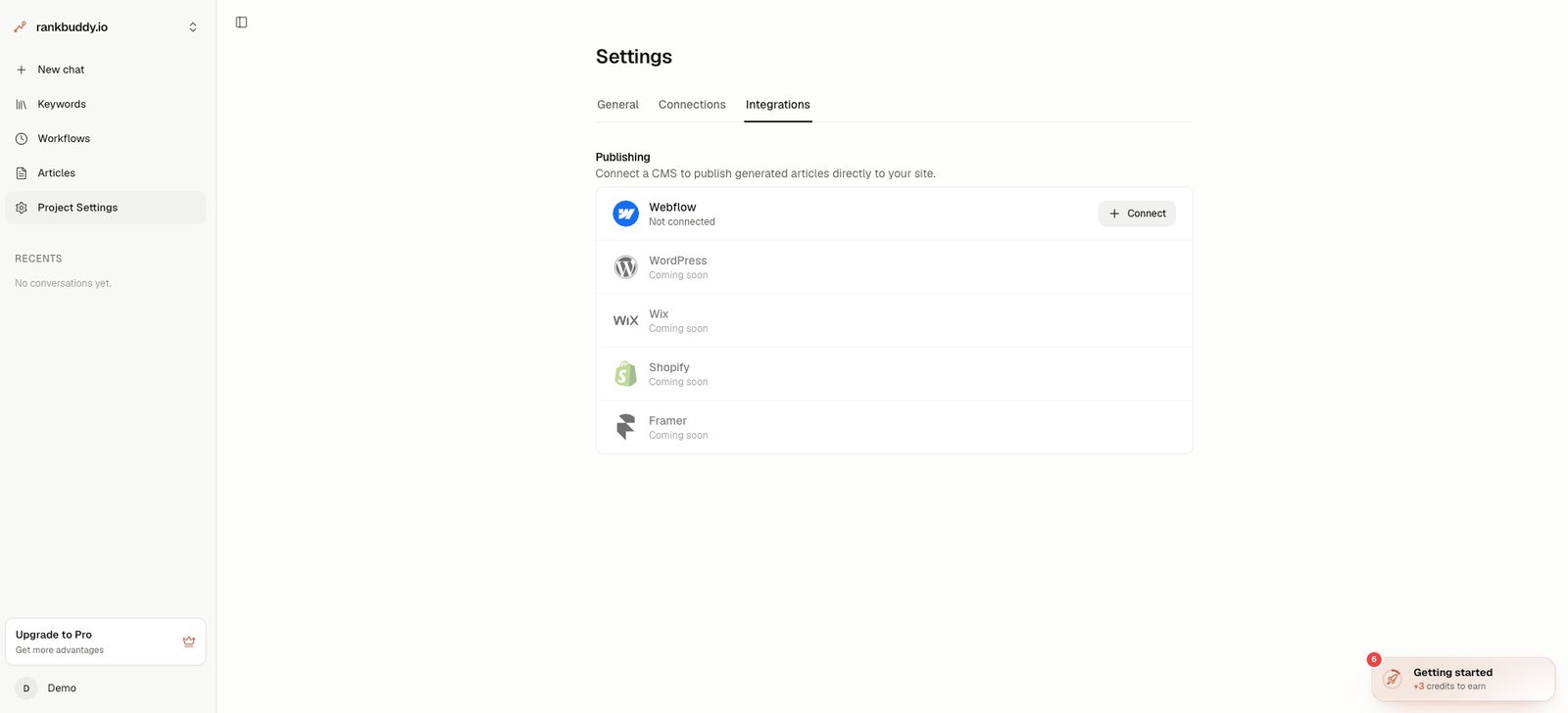
In RankBuddy, open your project and go to **Settings → Integrations**. Find **Webflow** in the list and press **Connect**.
Coming from the Webflow Marketplace instead? The install link brings you to the same place — sign in, pick the project, and you continue from step 2.
 Webflow asks which sites you want to authorize and shows the access RankBuddy requests:
* **Read Site data** — to list your sites
* **Read CMS data** — to read the collection's fields for mapping
* **Edit CMS data** — to create and update the articles it sends
Select your site and confirm. You'll land back in RankBuddy with the setup dialog open.
RankBuddy pre-selects the site and the collection that looks most like a blog. Change **Webflow Site** or **Webflow Collection** if it guessed differently.
The article title and slug always go to the collection's built-in **Name** and **Slug** fields. The rest is mapped for you and can be adjusted:
| Field | Required | What is written |
| -------------------------- | -------- | ------------------------------------------------------------- |
| Field to use for Post Body | Yes | The article body as rich text |
| Meta Title Field | No | The article's SEO title |
| Meta Description Field | No | The article's SEO description |
| Cover Image Field | No | The featured image — Webflow downloads it from its public URL |
Anything left as **Skip — don't map** is simply not managed by RankBuddy, so a field you fill in Webflow by hand stays yours.
Webflow asks which sites you want to authorize and shows the access RankBuddy requests:
* **Read Site data** — to list your sites
* **Read CMS data** — to read the collection's fields for mapping
* **Edit CMS data** — to create and update the articles it sends
Select your site and confirm. You'll land back in RankBuddy with the setup dialog open.
RankBuddy pre-selects the site and the collection that looks most like a blog. Change **Webflow Site** or **Webflow Collection** if it guessed differently.
The article title and slug always go to the collection's built-in **Name** and **Slug** fields. The rest is mapped for you and can be adjusted:
| Field | Required | What is written |
| -------------------------- | -------- | ------------------------------------------------------------- |
| Field to use for Post Body | Yes | The article body as rich text |
| Meta Title Field | No | The article's SEO title |
| Meta Description Field | No | The article's SEO description |
| Cover Image Field | No | The featured image — Webflow downloads it from its public URL |
Anything left as **Skip — don't map** is simply not managed by RankBuddy, so a field you fill in Webflow by hand stays yours.
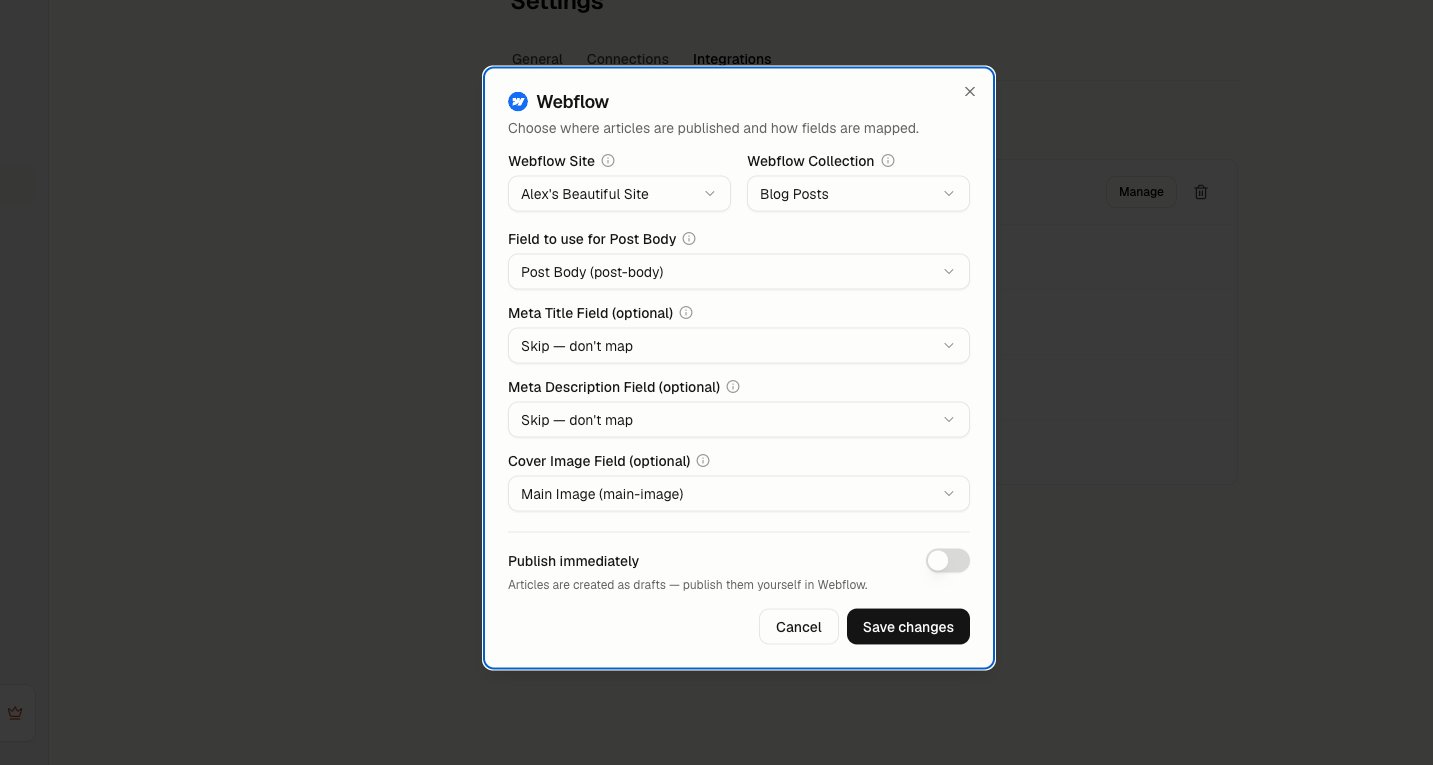 **Publish immediately** is off by default: articles are created as drafts for you to review in Webflow.
Turn it on only if you want every delivered article to go live on your site as soon as it syncs.
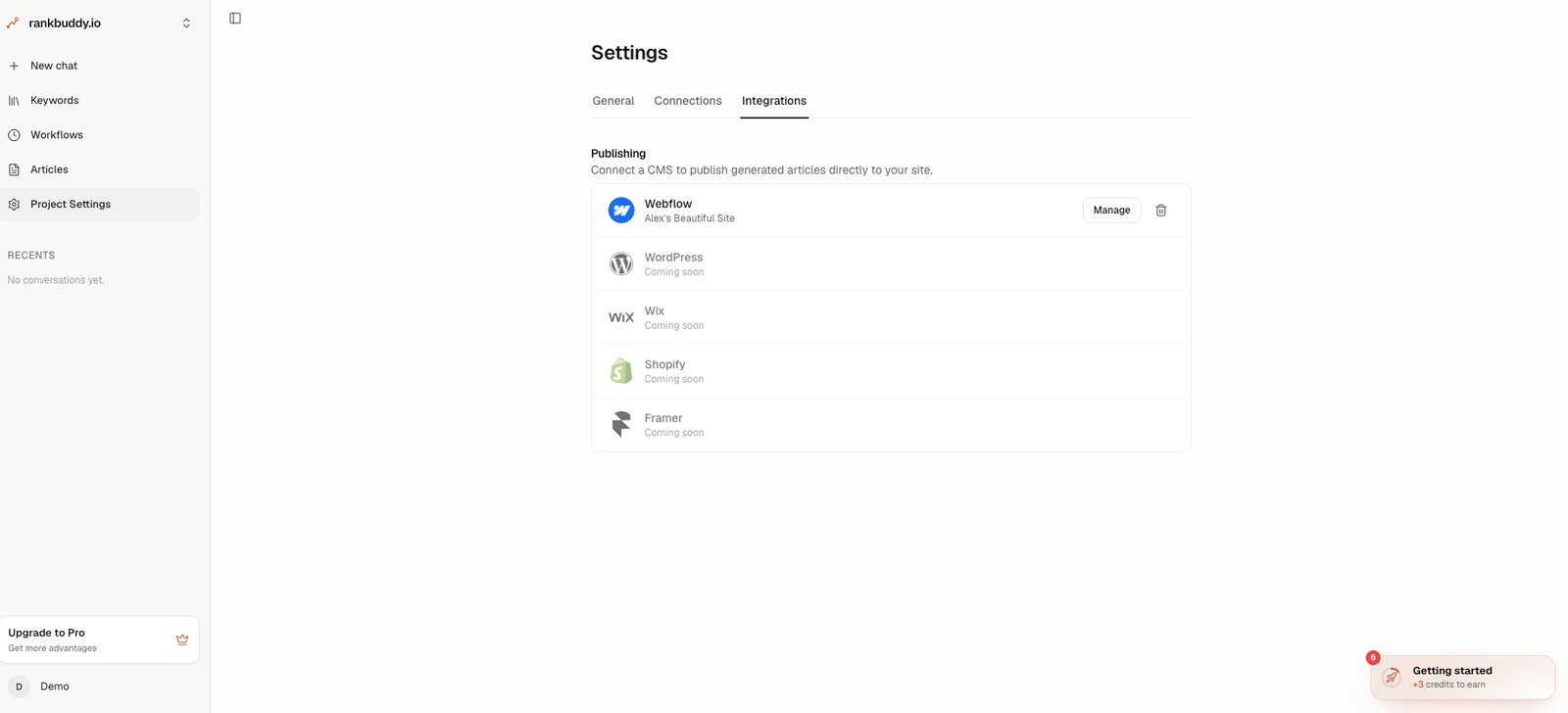
Press **Save**. The Webflow row in Settings now shows the connected site, and articles can be sent.
## Send an article
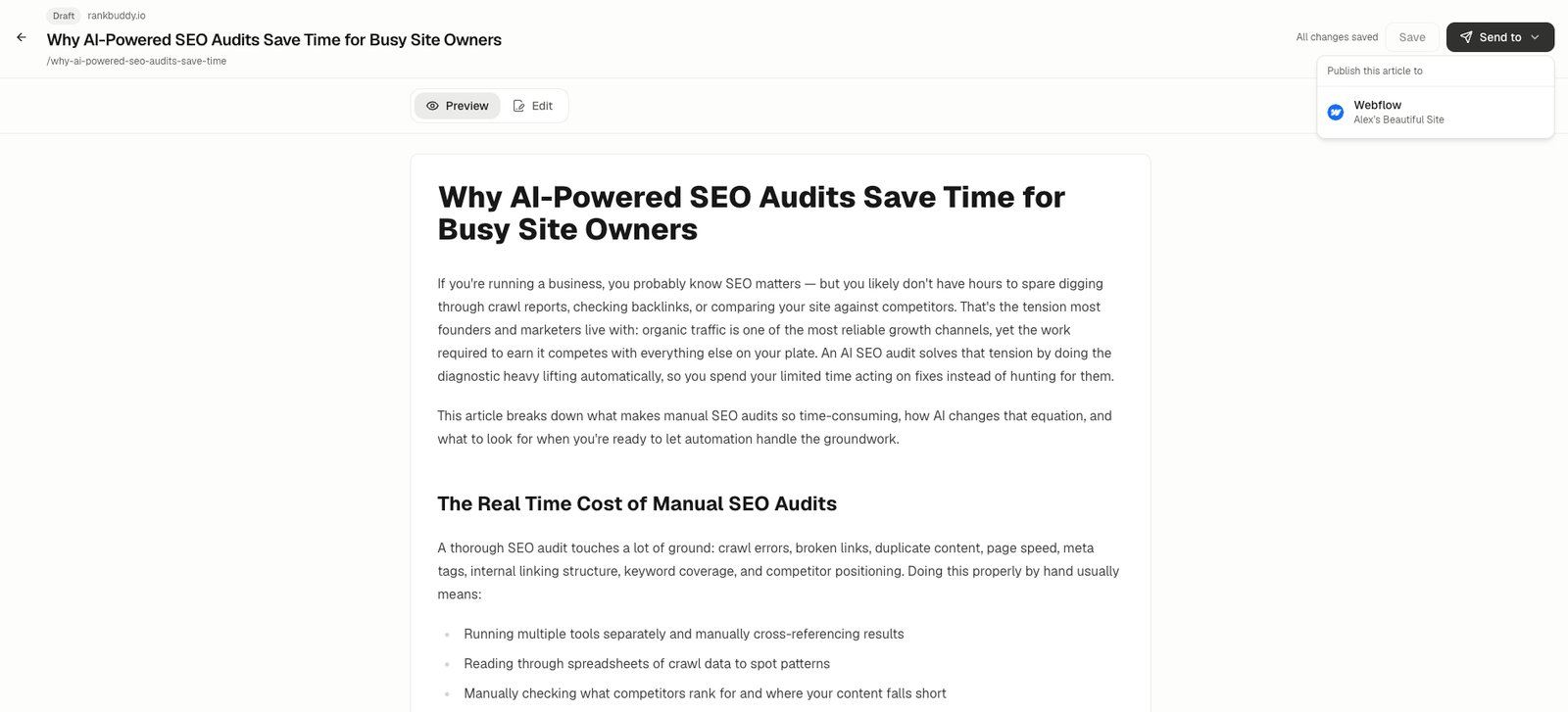
Open an article in RankBuddy and use **Send to** in the toolbar, then choose Webflow. A new item appears in the collection you selected.
**Publish immediately** is off by default: articles are created as drafts for you to review in Webflow.
Turn it on only if you want every delivered article to go live on your site as soon as it syncs.
Press **Save**. The Webflow row in Settings now shows the connected site, and articles can be sent.
## Send an article
Open an article in RankBuddy and use **Send to** in the toolbar, then choose Webflow. A new item appears in the collection you selected.
 Sending the same article again updates the item RankBuddy created earlier instead of adding a duplicate — so fixing a typo and re-sending is safe.
 An article that you already published by hand in Webflow stays published when you re-send it. RankBuddy only sets the draft state on items it creates.
## Reconnect or remove
If you uninstall RankBuddy in Webflow, or the access token is revoked or rotated, the next delivery fails and the Webflow row switches to **Reconnect required**. Press **Reconnect** and authorize again — your site, collection, and field mapping are kept.
To disconnect, press the trash icon on the Webflow row. RankBuddy deletes the stored token and revokes its authorization in your Webflow account. Articles already delivered stay in your CMS.
An article that you already published by hand in Webflow stays published when you re-send it. RankBuddy only sets the draft state on items it creates.
## Reconnect or remove
If you uninstall RankBuddy in Webflow, or the access token is revoked or rotated, the next delivery fails and the Webflow row switches to **Reconnect required**. Press **Reconnect** and authorize again — your site, collection, and field mapping are kept.
To disconnect, press the trash icon on the Webflow row. RankBuddy deletes the stored token and revokes its authorization in your Webflow account. Articles already delivered stay in your CMS.
 Deleting a collection or a mapped field in Webflow breaks delivery for that project. Re-open the setup dialog and choose the new collection or field.
## Troubleshooting
| Symptom | Likely cause | Fix |
| ------------------------------------------------- | ------------------------------------------------------------------------------------------------------ | ------------------------------------------------------------------------------------ |
| No sites listed on Webflow's authorization screen | You're signed into a Webflow account or workspace with no sites, or without permission to install apps | Sign in with the account that owns the site, or ask its workspace admin to authorize |
| "Could not map CMS fields automatically" | The collection has no Rich Text field for the body | Add a Rich Text field to the collection, then reconnect |
| Article is a draft in Webflow | Expected — this is the default | Publish it in Webflow, or turn on **Publish immediately** in the setup dialog |
| Cover image missing on the item | No image field mapped, or the image URL isn't publicly reachable | Map a **Cover Image Field**; Webflow must be able to download the image |
| Webflow row says "Reconnect required" | The app was uninstalled in Webflow, or the token was revoked | Press **Reconnect** and authorize again |
| A second item appeared for the same article | The original item was deleted in Webflow | Expected — RankBuddy re-creates an item it can no longer find |
Deleting a collection or a mapped field in Webflow breaks delivery for that project. Re-open the setup dialog and choose the new collection or field.
## Troubleshooting
| Symptom | Likely cause | Fix |
| ------------------------------------------------- | ------------------------------------------------------------------------------------------------------ | ------------------------------------------------------------------------------------ |
| No sites listed on Webflow's authorization screen | You're signed into a Webflow account or workspace with no sites, or without permission to install apps | Sign in with the account that owns the site, or ask its workspace admin to authorize |
| "Could not map CMS fields automatically" | The collection has no Rich Text field for the body | Add a Rich Text field to the collection, then reconnect |
| Article is a draft in Webflow | Expected — this is the default | Publish it in Webflow, or turn on **Publish immediately** in the setup dialog |
| Cover image missing on the item | No image field mapped, or the image URL isn't publicly reachable | Map a **Cover Image Field**; Webflow must be able to download the image |
| Webflow row says "Reconnect required" | The app was uninstalled in Webflow, or the token was revoked | Press **Reconnect** and authorize again |
| A second item appeared for the same article | The original item was deleted in Webflow | Expected — RankBuddy re-creates an item it can no longer find |